# 一键可视化Nginx日志

兄弟们有没有遇到过这种情况？网站突然卡顿，翻遍服务器日志却找不到头绪；想知道哪些 接口被频繁调用，却对着密密麻麻的文本文件抓瞎。今天二冰给大家带来一个开箱即用的运 维神器——用Docker三分钟搭建Nginx Proxy Manager日志可视化平台！

## <span class="" style="-webkit-tap-highlight-color: transparent; padding: 0px 0px 0px 10px; outline: 0px; max-width: 100%; box-sizing: border-box; overflow-wrap: break-word !important; font-family: STHeitiSC-Light; font-size: 18px; font-weight: bolder; display: inline-block; border-left: 5px solid #F83929; visibility: visible;">项目简介：GoAccess for Nginx Proxy Manager</span>

项目地址：https://github.com/xavier-hernandez/goaccess-for-nginxproxymanager

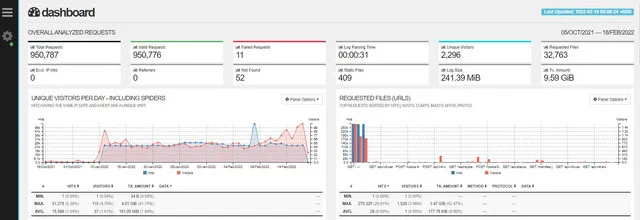
这个基于GoAccess的专用镜像，完美适配Nginx Proxy Manager的日志格式。无需研究复杂 的命令行参数，挂载日志目录就能生成酷炫的实时监控面板，流量统计、访问排行、异常请 求一目了然。

<figure id="bkmrk--1" style="-webkit-tap-highlight-color: transparent; margin: 10px 0px; padding: 0px; outline: 0px; max-width: 100%; box-sizing: border-box; color: rgba(0, 0, 0, 0.9); font-family: 'PingFang SC', system-ui, -apple-system, BlinkMacSystemFont, 'Helvetica Neue', 'Hiragino Sans GB', 'Microsoft YaHei UI', 'Microsoft YaHei', Arial, sans-serif; font-size: 17px; letter-spacing: 0.544px; text-align: justify; text-wrap: wrap; background-color: rgb(255, 255, 255); visibility: visible; overflow-wrap: break-word !important;">![1.webp](https://www.lesrec.cn/static/upload/image/20250702/1751449041719104.webp)<figcaption style="-webkit-tap-highlight-color: transparent; margin: 5px 0px 0px; padding: 0px; outline: 0px; max-width: 100%; box-sizing: border-box; text-align: center; color: rgb(136, 136, 136); font-size: 12px; font-family: PingFangSC-Light; overflow-wrap: break-word !important;"></figcaption></figure>## <span class="" style="-webkit-tap-highlight-color: transparent; padding: 0px 0px 0px 10px; outline: 0px; max-width: 100%; box-sizing: border-box; overflow-wrap: break-word !important; font-family: STHeitiSC-Light; font-size: 18px; font-weight: bolder; display: inline-block; border-left: 5px solid #F83929;">四大核心优势</span>

<section class="" id="bkmrk-1.%E9%9B%B6%E9%85%8D%E7%BD%AE%E5%BC%80%E7%AE%B1%E5%8D%B3%E7%94%A8%EF%BC%9A%E4%B8%93%E4%B8%BAnginx-pr" style="-webkit-tap-highlight-color: transparent; margin: 8px 0px; padding: 0px 0px 0px 25px; outline: 0px; max-width: 100%; box-sizing: border-box; font-family: 'PingFang SC', system-ui, -apple-system, BlinkMacSystemFont, 'Helvetica Neue', 'Hiragino Sans GB', 'Microsoft YaHei UI', 'Microsoft YaHei', Arial, sans-serif; font-size: 17px; letter-spacing: 0.544px; text-align: justify; text-wrap: wrap; background-color: rgb(255, 255, 255); overflow-wrap: break-word !important;"><span class="" style="-webkit-tap-highlight-color: transparent; margin: 5px 0px; padding: 0px; outline: 0px; max-width: 100%; box-sizing: border-box; line-height: 26px; text-align: left; color: #010101; display: block; overflow-wrap: break-word !important;"><span style="-webkit-tap-highlight-color: transparent; margin: 0px 6px 0px 0px; padding: 0px; outline: 0px; max-width: 100%; box-sizing: border-box; overflow-wrap: break-word !important;">1.</span>**零配置开箱即用**：专为Nginx Proxy Manager优化，自动解析日志格式</span><span class="" style="-webkit-tap-highlight-color: transparent; margin: 5px 0px; padding: 0px; outline: 0px; max-width: 100%; box-sizing: border-box; line-height: 26px; text-align: left; color: #010101; display: block; overflow-wrap: break-word !important;"><span style="-webkit-tap-highlight-color: transparent; margin: 0px 6px 0px 0px; padding: 0px; outline: 0px; max-width: 100%; box-sizing: border-box; overflow-wrap: break-word !important;">2.</span>**实时动态刷新**：每秒更新数据，流量波动尽在掌握</span><span class="" style="-webkit-tap-highlight-color: transparent; margin: 5px 0px; padding: 0px; outline: 0px; max-width: 100%; box-sizing: border-box; line-height: 26px; text-align: left; color: #010101; display: block; overflow-wrap: break-word !important;"><span style="-webkit-tap-highlight-color: transparent; margin: 0px 6px 0px 0px; padding: 0px; outline: 0px; max-width: 100%; box-sizing: border-box; overflow-wrap: break-word !important;">3.</span>**中文友好界面**：自带中文语言包，统计指标清晰易懂</span><span class="" style="-webkit-tap-highlight-color: transparent; margin: 5px 0px; padding: 0px; outline: 0px; max-width: 100%; box-sizing: border-box; line-height: 26px; text-align: left; color: #010101; display: block; overflow-wrap: break-word !important;"><span style="-webkit-tap-highlight-color: transparent; margin: 0px 6px 0px 0px; padding: 0px; outline: 0px; max-width: 100%; box-sizing: border-box; overflow-wrap: break-word !important;">4.</span>**Docker极简部署**：一条命令完成安装，支持群晖等NAS设备</span></section>## <span class="" style="-webkit-tap-highlight-color: transparent; padding: 0px 0px 0px 10px; outline: 0px; max-width: 100%; box-sizing: border-box; overflow-wrap: break-word !important; font-family: STHeitiSC-Light; font-size: 18px; font-weight: bolder; display: inline-block; border-left: 5px solid #F83929;">手把手Dockge部署教程</span>

### <span class="" style="-webkit-tap-highlight-color: transparent; padding: 0px; outline: 0px; max-width: 100%; box-sizing: border-box; overflow-wrap: break-word !important; font-size: 14px; color: #a5d55d;">第一步：准备compose.yaml</span>

<section class="code-snippet__fix code-snippet__js" id="bkmrk-version%3A%C2%A0%223%22%C2%A0service" style="-webkit-tap-highlight-color: transparent; margin: 10px 0px; padding: 0px; outline: 0px; max-width: 1000%; box-sizing: border-box; overflow-wrap: break-word; color: rgb(51, 51, 51); position: relative; background-color: rgba(0, 0, 0, 0.03); border: 1px solid rgb(240, 240, 240); border-radius: 2px; display: flex; line-height: 20px; font-family: 'PingFang SC', system-ui, -apple-system, BlinkMacSystemFont, 'Helvetica Neue', 'Hiragino Sans GB', 'Microsoft YaHei UI', 'Microsoft YaHei', Arial, sans-serif; letter-spacing: 0.544px; text-align: justify; text-wrap: wrap;">```
version: "3" services: goaccess: image: xavierh/goaccess-for-nginxproxymanager:latest container_name: goaccess restart: unless-stopped ports: - "7880:7880" volumes: - /你的日志目录:/opt/log # 例如/volume1/docker/npm/data/logs environment: - TZ=Asia/Shanghai -.UTF-8 - LANGUAGE=zh_CN.UTF-8 - SKIP_ARCHIVED_LOGS=False - EXCLUDE_IPS=127.0.0.1
```

</section>### <span class="" style="-webkit-tap-highlight-color: transparent; padding: 0px; outline: 0px; max-width: 100%; box-sizing: border-box; overflow-wrap: break-word !important; font-size: 14px; color: #a5d55d;">第二步：Dockge一键部署</span>

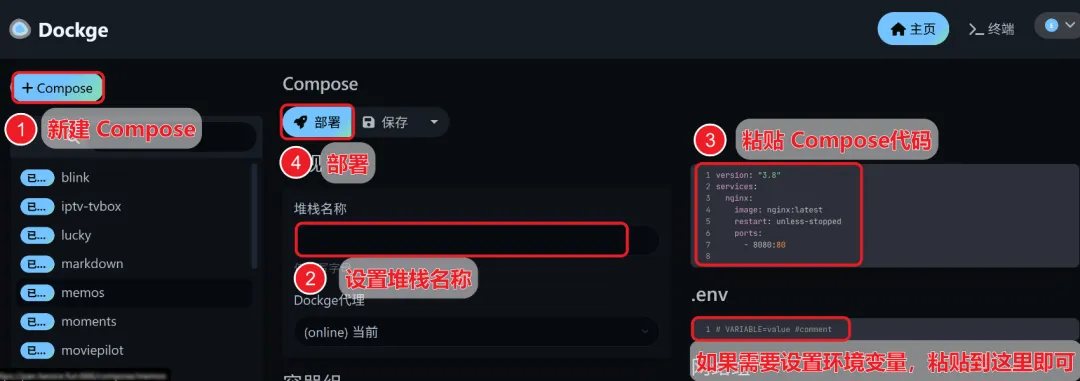
打开`Dockge`面板 -&gt; `创建堆栈` -&gt; 设置`堆栈`名称 -&gt; 粘贴`compose`代码 -&gt; 30 秒`启动`成功！

<figure id="bkmrk--8" style="-webkit-tap-highlight-color: transparent; margin: 10px 0px; padding: 0px; outline: 0px; max-width: 100%; box-sizing: border-box; color: rgba(0, 0, 0, 0.9); font-family: 'PingFang SC', system-ui, -apple-system, BlinkMacSystemFont, 'Helvetica Neue', 'Hiragino Sans GB', 'Microsoft YaHei UI', 'Microsoft YaHei', Arial, sans-serif; font-size: 17px; letter-spacing: 0.544px; text-align: justify; text-wrap: wrap; background-color: rgb(255, 255, 255); overflow-wrap: break-word !important;">![2.webp](https://www.lesrec.cn/static/upload/image/20250702/1751449065459206.webp)<figcaption style="-webkit-tap-highlight-color: transparent; margin: 5px 0px 0px; padding: 0px; outline: 0px; max-width: 100%; box-sizing: border-box; text-align: center; color: rgb(136, 136, 136); font-size: 12px; font-family: PingFangSC-Light; overflow-wrap: break-word !important;"></figcaption></figure>## <span class="" style="-webkit-tap-highlight-color: transparent; padding: 0px 0px 0px 10px; outline: 0px; max-width: 100%; box-sizing: border-box; overflow-wrap: break-word !important; font-family: STHeitiSC-Light; font-size: 18px; font-weight: bolder; display: inline-block; border-left: 5px solid #F83929;">使用效果全展示</span>

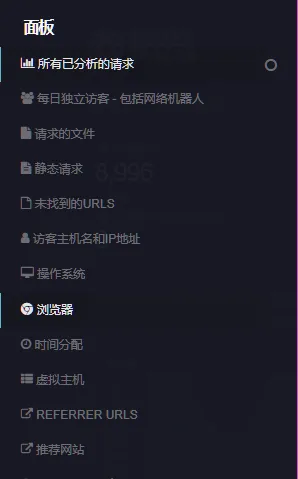
访问 `http://你的服务器IP:7880` 即可看到：

<section class="" id="bkmrk-1.%E5%AE%9E%E6%97%B6%E6%B5%81%E9%87%8F%E7%9C%8B%E6%9D%BF%EF%BC%9A%E6%AF%8F%E7%A7%92%E8%AF%B7%E6%B1%82%E6%95%B0%E3%80%81%E5%B8%A6%E5%AE%BD%E5%8D%A0%E7%94%A8%E8%B6%8B" style="-webkit-tap-highlight-color: transparent; margin: 8px 0px; padding: 0px 0px 0px 25px; outline: 0px; max-width: 100%; box-sizing: border-box; font-family: 'PingFang SC', system-ui, -apple-system, BlinkMacSystemFont, 'Helvetica Neue', 'Hiragino Sans GB', 'Microsoft YaHei UI', 'Microsoft YaHei', Arial, sans-serif; font-size: 17px; letter-spacing: 0.544px; text-align: justify; text-wrap: wrap; background-color: rgb(255, 255, 255); overflow-wrap: break-word !important;"><span class="" style="-webkit-tap-highlight-color: transparent; margin: 5px 0px; padding: 0px; outline: 0px; max-width: 100%; box-sizing: border-box; line-height: 26px; text-align: left; color: #010101; display: block; overflow-wrap: break-word !important;"><span style="-webkit-tap-highlight-color: transparent; margin: 0px 6px 0px 0px; padding: 0px; outline: 0px; max-width: 100%; box-sizing: border-box; overflow-wrap: break-word !important;">1.</span>**实时流量看板**：每秒请求数、带宽占用趋势图</span><span class="" style="-webkit-tap-highlight-color: transparent; margin: 5px 0px; padding: 0px; outline: 0px; max-width: 100%; box-sizing: border-box; line-height: 26px; text-align: left; color: #010101; display: block; overflow-wrap: break-word !important;"><span style="-webkit-tap-highlight-color: transparent; margin: 0px 6px 0px 0px; padding: 0px; outline: 0px; max-width: 100%; box-sizing: border-box; overflow-wrap: break-word !important;">2.</span>**热门访问排行**：最常访问的URL、客户端IP排行</span><span class="" style="-webkit-tap-highlight-color: transparent; margin: 5px 0px; padding: 0px; outline: 0px; max-width: 100%; box-sizing: border-box; line-height: 26px; text-align: left; color: #010101; display: block; overflow-wrap: break-word !important;"><span style="-webkit-tap-highlight-color: transparent; margin: 0px 6px 0px 0px; padding: 0px; outline: 0px; max-width: 100%; box-sizing: border-box; overflow-wrap: break-word !important;">3.</span>**异常请求监控**：4xx/5xx错误请求自动标红</span><span class="" style="-webkit-tap-highlight-color: transparent; margin: 5px 0px; padding: 0px; outline: 0px; max-width: 100%; box-sizing: border-box; line-height: 26px; text-align: left; color: #010101; display: block; overflow-wrap: break-word !important;"><span style="-webkit-tap-highlight-color: transparent; margin: 0px 6px 0px 0px; padding: 0px; outline: 0px; max-width: 100%; box-sizing: border-box; overflow-wrap: break-word !important;">4.</span>**设备类型分析**：移动端/PC端占比一目了然</span></section><figure id="bkmrk-image-34%3A-%E5%9C%A8%E8%BF%99%E9%87%8C%E6%8F%92%E5%85%A5%E5%9B%BE%E7%89%87%E6%8F%8F%E8%BF%B0" style="-webkit-tap-highlight-color: transparent; margin: 10px 0px; padding: 0px; outline: 0px; max-width: 100%; box-sizing: border-box; color: rgba(0, 0, 0, 0.9); font-family: 'PingFang SC', system-ui, -apple-system, BlinkMacSystemFont, 'Helvetica Neue', 'Hiragino Sans GB', 'Microsoft YaHei UI', 'Microsoft YaHei', Arial, sans-serif; font-size: 17px; letter-spacing: 0.544px; text-align: justify; text-wrap: wrap; background-color: rgb(255, 255, 255); overflow-wrap: break-word !important;"><figcaption style="-webkit-tap-highlight-color: transparent; margin: 5px 0px 0px; padding: 0px; outline: 0px; max-width: 100%; box-sizing: border-box; text-align: center; color: rgb(136, 136, 136); font-size: 12px; font-family: PingFangSC-Light; overflow-wrap: break-word !important;">![3.webp](https://www.lesrec.cn/static/upload/image/20250702/1751449073321417.webp)Image 34: 在这里插入图片描述</figcaption></figure>## <span class="" style="-webkit-tap-highlight-color: transparent; padding: 0px 0px 0px 10px; outline: 0px; max-width: 100%; box-sizing: border-box; overflow-wrap: break-word !important; font-family: STHeitiSC-Light; font-size: 18px; font-weight: bolder; display: inline-block; border-left: 5px solid #F83929;">二冰实测总结</span>

**推荐指数**：★★★★☆

**适合人群**：

<section class="" id="bkmrk-%E2%80%A2%E4%BD%BF%E7%94%A8nginx-proxy-manag" style="-webkit-tap-highlight-color: transparent; margin: 8px 0px; padding: 0px 0px 0px 25px; outline: 0px; max-width: 100%; box-sizing: border-box; font-family: 'PingFang SC', system-ui, -apple-system, BlinkMacSystemFont, 'Helvetica Neue', 'Hiragino Sans GB', 'Microsoft YaHei UI', 'Microsoft YaHei', Arial, sans-serif; font-size: 17px; letter-spacing: 0.544px; text-align: justify; text-wrap: wrap; background-color: rgb(255, 255, 255); overflow-wrap: break-word !important;"><span class="" style="-webkit-tap-highlight-color: transparent; margin: 5px 0px; padding: 0px; outline: 0px; max-width: 100%; box-sizing: border-box; line-height: 26px; text-align: left; color: #010101; display: block; overflow-wrap: break-word !important;"><span style="-webkit-tap-highlight-color: transparent; margin: 0px 6px 0px 0px; padding: 0px; outline: 0px; max-width: 100%; box-sizing: border-box; overflow-wrap: break-word !important;">•</span>使用Nginx Proxy Manager的运维人员</span><span class="" style="-webkit-tap-highlight-color: transparent; margin: 5px 0px; padding: 0px; outline: 0px; max-width: 100%; box-sizing: border-box; line-height: 26px; text-align: left; color: #010101; display: block; overflow-wrap: break-word !important;"><span style="-webkit-tap-highlight-color: transparent; margin: 0px 6px 0px 0px; padding: 0px; outline: 0px; max-width: 100%; box-sizing: border-box; overflow-wrap: break-word !important;">•</span>需要监控多站点流量的站长</span><span class="" style="-webkit-tap-highlight-color: transparent; margin: 5px 0px; padding: 0px; outline: 0px; max-width: 100%; box-sizing: border-box; line-height: 26px; text-align: left; color: #010101; display: block; overflow-wrap: break-word !important;"><span style="-webkit-tap-highlight-color: transparent; margin: 0px 6px 0px 0px; padding: 0px; outline: 0px; max-width: 100%; box-sizing: border-box; overflow-wrap: break-word !important;">•</span>想快速定位接口性能瓶颈的开发者</span></section>**注意事项**：

<section class="" id="bkmrk-1.%E6%97%A5%E5%BF%97%E7%9B%AE%E5%BD%95%E9%9C%80%E8%B5%8B%E4%BA%88%E5%AE%B9%E5%99%A8%E8%AF%BB%E5%8F%96%E6%9D%83%E9%99%902.%E9%A6%96%E6%AC%A1%E5%8A%A0" style="-webkit-tap-highlight-color: transparent; margin: 8px 0px; padding: 0px 0px 0px 25px; outline: 0px; max-width: 100%; box-sizing: border-box; font-family: 'PingFang SC', system-ui, -apple-system, BlinkMacSystemFont, 'Helvetica Neue', 'Hiragino Sans GB', 'Microsoft YaHei UI', 'Microsoft YaHei', Arial, sans-serif; font-size: 17px; letter-spacing: 0.544px; text-align: justify; text-wrap: wrap; background-color: rgb(255, 255, 255); overflow-wrap: break-word !important;"><span class="" style="-webkit-tap-highlight-color: transparent; margin: 5px 0px; padding: 0px; outline: 0px; max-width: 100%; box-sizing: border-box; line-height: 26px; text-align: left; color: #010101; display: block; overflow-wrap: break-word !important;"><span style="-webkit-tap-highlight-color: transparent; margin: 0px 6px 0px 0px; padding: 0px; outline: 0px; max-width: 100%; box-sizing: border-box; overflow-wrap: break-word !important;">1.</span>日志目录需赋予容器读取权限</span><span class="" style="-webkit-tap-highlight-color: transparent; margin: 5px 0px; padding: 0px; outline: 0px; max-width: 100%; box-sizing: border-box; line-height: 26px; text-align: left; color: #010101; display: block; overflow-wrap: break-word !important;"><span style="-webkit-tap-highlight-color: transparent; margin: 0px 6px 0px 0px; padding: 0px; outline: 0px; max-width: 100%; box-sizing: border-box; overflow-wrap: break-word !important;">2.</span>首次加载历史日志可能需要1-2分钟</span><span class="" style="-webkit-tap-highlight-color: transparent; margin: 5px 0px; padding: 0px; outline: 0px; max-width: 100%; box-sizing: border-box; line-height: 26px; text-align: left; color: #010101; display: block; overflow-wrap: break-word !important;"><span style="-webkit-tap-highlight-color: transparent; margin: 0px 6px 0px 0px; padding: 0px; outline: 0px; max-width: 100%; box-sizing: border-box; overflow-wrap: break-word !important;">3.</span>高并发场景建议配置日志轮转策略</span></section>这个项目最大的惊喜是完美保留了GoAccess的专业分析能力，又通过Docker封装大幅降低了 使用门槛。实测在4核8G服务器上处理百万级日志毫无压力，界面响应速度堪比商业监控系 统。唯一的遗憾是暂不支持多日志源混合分析，不过对专注NPM的用户来说完全够用！

需要看板演示的兄弟，欢迎在评论区留言索取测试地址。如果觉得这篇教程有帮助，记得点 赞收藏支持一波！

最后，奉上我的超级无敌至尊docker库，二冰平时玩过的docker都整理到了这个仓库中了， 一直在更新中，希望有github账号的兄弟能去给点个star，不知道玩啥的，都去这里面找， 都给你们分好类了 **仓库链接：** [https://github.com/TWO-ICE/Awesome-NAS-Docker](https://github.com/TWO-ICE/Awesome-NAS-Docker)

Ubuntu系统中文显示教程：

1.安装中文包

apt update  
apt install language-pack-zh-hans  
2.将区域语言设置为简体中文

localectl set-locale LANG=zh\_CN.utf8

localectl status  
localectl list-locales | grep zh  
localectl set-locale LANG=zh\_CN.utf8  
localectl status

docker exec -it goaccess /bin/bash  
\#在容器内执行，建议先备份/var/www/html/index.html  
LANG="zh\_CN.UTF-8" ./goaccess -f /opt/log/access.log --log-format=COMBINED &gt; /var/www/html/index.html

显示效果如下：

[![wechat_2025-07-05_112106_189.png](https://bost.lesrec.cn/uploads/images/gallery/2025-07/scaled-1680-/Hh6OG1HLCrS6uSmy-wechat-2025-07-05-112106-189.png)](https://bost.lesrec.cn/uploads/images/gallery/2025-07/Hh6OG1HLCrS6uSmy-wechat-2025-07-05-112106-189.png)

[![wechat_2025-07-05_112120_026.png](https://bost.lesrec.cn/uploads/images/gallery/2025-07/scaled-1680-/5MKNRYa83AVXPeST-wechat-2025-07-05-112120-026.png)](https://bost.lesrec.cn/uploads/images/gallery/2025-07/5MKNRYa83AVXPeST-wechat-2025-07-05-112120-026.png)

[![wechat_2025-07-05_112132_746.png](https://bost.lesrec.cn/uploads/images/gallery/2025-07/scaled-1680-/lN5O6I9uVXC0Ce3y-wechat-2025-07-05-112132-746.png)](https://bost.lesrec.cn/uploads/images/gallery/2025-07/lN5O6I9uVXC0Ce3y-wechat-2025-07-05-112132-746.png)